Rotary Member Directory

·360 words·2 mins
Table of Contents

Our organization produces member directories every year. They are tedious to create and prone to typos / inaccuracies. How can I use a database to create a member directory or product catalog?


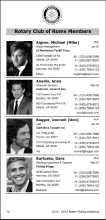
For a number of years, the Rotary Club of Rome Georgia has created a printed photo directory. It was the result of a lot of hours of work from a dedicated committee within the club and skilled typesetting/printing services of a local printing company. With 4" x 8" dimensions, it was convenient for club members to reference. However, it was a clerical challenge each year to communicate the new committee assignments and change of address information to the printer. It was also expensive to have typeset. We suggested they take an alternate approach using Microsoft Access.

Microsoft Access - Desktop Publishing Example
#

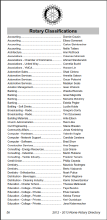
Our company created a Microsoft Access database and Word document template for creating this directory. It has reduced the overall time and printing costs by giving the committee members the means to create print-ready Adobe PDF content. We think it’s a neat example of how the Microsoft Access and Word can generate attractive printed content.

The development work was donated to the Rotary Club of Rome and we are making a free version of the database and Word template available for others interested in duplicating this directory for their clubs.

Sample images from the database are provided below. A full sample directory in PDF format is available here.
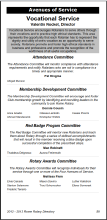
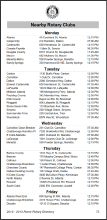
Rotary-AOS_0.png
Rotary-nearby_0.png
Rotary-Photo.png
Rotary-Class.png

A video describing the process is available below
#


Other Print-Ready Examples with Microsoft Access
#

This same approach can be used for a variety of other printed products. The Microsoft Access reporting engine is very powerful. Many people are already comfortable with using this Office tool. We can help you add the extra details of alternate left and right page header/footers, smart page numbering, and similar Visual Basic for Applications goodies. Perhaps you want to create a PDF version of your product catalog? Or an internal staff photo directory? Give us a call and tell us how we can help.

Note: All photos are courtesy of Wikimedia Commons. Fictitious name and address data courtesy of BrianDunning.com.


featured.jpg
Jonathan Bartleson
Author
Jonathan Bartleson

Related

Microsoft Professional Program in Data Science

·633 words·3 mins
Microsoft recently announced a 10-part online course entitled Microsoft Professional Program in Data Science. Over the last couple of months, I’ve been working through this sequence and wanted to share with others what the experience has been like. The topics are a pretty direct “hit” for me as I’ve wanted to shore up my skills on the analysis side of things to complement skills in SQL Server. Curriculum for Microsoft Professional Program in Data Science # The curriculum is provided via edX.org and consists of 9 classes with a 10th element being a capstone project. The courses can be audited for free. If you are interested in completing all 10 you’re eligible for a new badge of sorts known as a “Microsoft Professional Program Certificate in Data Science”. The certificate status requires paying for individual classes. Program details are here: https://academy.microsoft.com/en-us/professional-program/data-science/

DAT213 - Analyzing Big Data with Microsoft R Server

·773 words·4 mins
This course teaches exploratory data analysis skills using the Microsoft R Server implementation known as RevoScaleR. This product is in most ways functionally equivalent to the open source CRAN-R. RevoScaleR offers three significant benefits over its open source brother: the ability to run analyses in parallel across different servers, the ability to “chunk” data for evaluation and bypass the in-memory limitation of R, and the ability to read more natively from data sources like SQL Server, Hadoop, and Spark. This course explains these benefits and allows a new user to become familiar with the RevoScaleR tool. Analyzing Big Data with Microsoft R Server # The course is divided into 4 segments:

DAT209 - Programming R

·373 words·2 mins
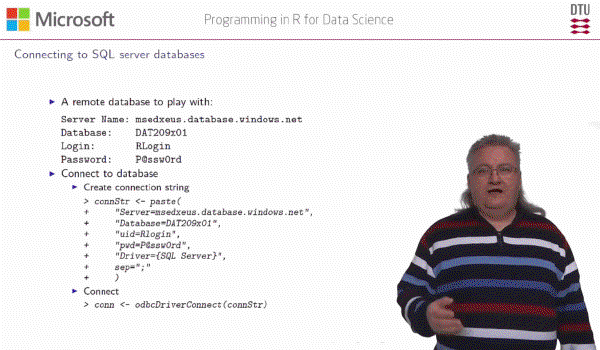
Programming R for Data Science is taught by Anders Stockmarr (on the faculty of Technical University of Denmark.) For US audiences, his accent requires some getting used to. He places emphasis on unexpected syllables and has a unique way of pronouncing many things. I found it helpful to use headphones and to adjust the playback speed of the recordings. It is worth making the effort to understand Dr. Stockmarr because he has put together a course with a lot of substance, using a tight script and backed up by supporting exercises. Programming R Course Highlights # I genuinely enjoyed this course, it goes a lot deeper than the introductory course in R taken earlier in the MPP sequence. For the first course, I used RStudio to experiment. With this course, I wanted to use the Visual Studio version of R to work the exercises and labs. The R Tools for Visual Studio (https://www.visualstudio.com/vs/rtvs/) required some fiddling to get installed, but were stable and had nice IDE features I’ve become used to with VS. Becoming familiar with R Tools for Visual Studio at this point will prepare you for taking DAT213 “Analyzing Big Data in MS R Server” which is the logical follow-on course in the MPP Data Science sequence.